

Gemini Chat Completion API Application and Usage
Google Gemini is a very powerful AI conversational system. Simply by entering a prompt, it can generate fluent and natural responses in just a few seconds. Gemini can provide astonishing intelligent assistance, greatly improving human work efficiency and creativity.
This document mainly introduces the usage process of Gemini Chat Completion API operations. With it, we can easily use the official Gemini conversational features.
¶ Application Process
To use the Gemini Chat Completion API, first go to the 零壹AI Console to obtain your API Token and keep it as a backup.
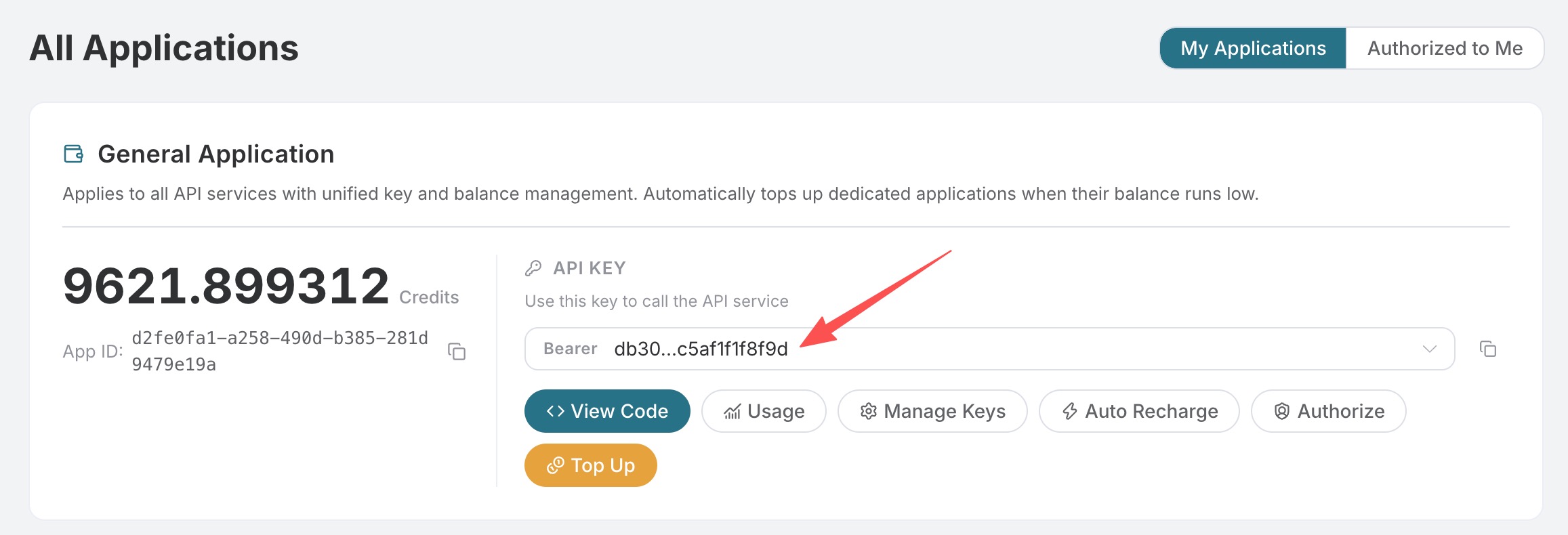
If you have not yet logged in or registered, you will be automatically redirected to the login page and invited to register and log in. After completion, you will automatically return to the current page.
One API Token can call all services on the platform; there is no need to apply separately for each service. Your first application will include free credits for a free trial; when credits are insufficient, you can recharge your general balance in the Console.
📘 Full documentation: Gemini Chat Completion API →
¶ Basic Usage
Next, you can fill in the corresponding content in the interface, as shown in the figure:
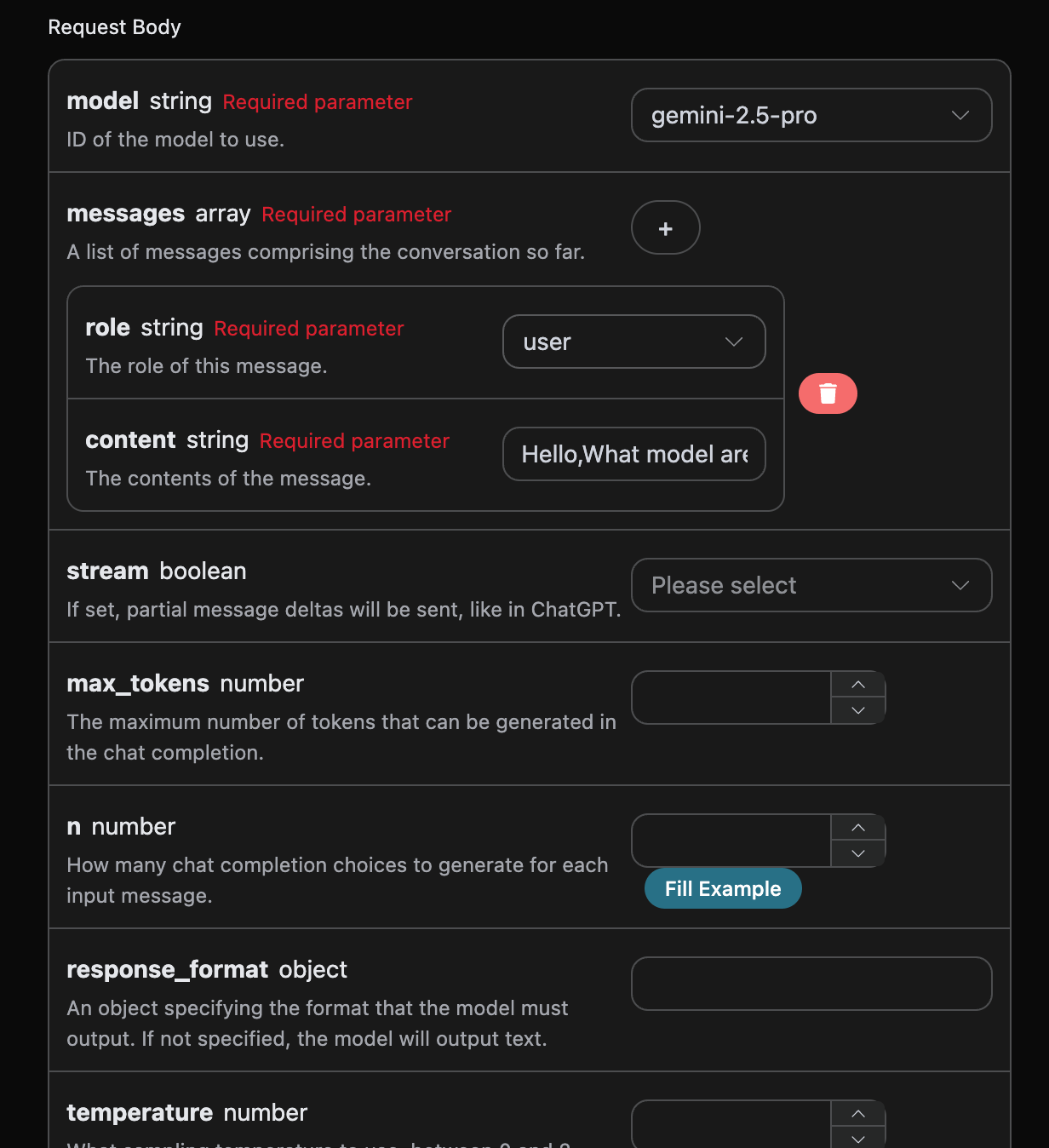
When using this interface for the first time, we need to fill in at least three items. One is authorization, which can be selected directly from the dropdown list. Another parameter is model; model is the official Gemini model category that we choose to use, and the available models are subject to the model enumeration in the API documentation. The last parameter is messages; messages is the array of prompt text we enter. It is an array, indicating that multiple prompts can be uploaded at the same time. Each prompt includes role and content, where role indicates the role of the questioner. We provide three identities: user, assistant, and system. The other field, content, is the specific content of our question.
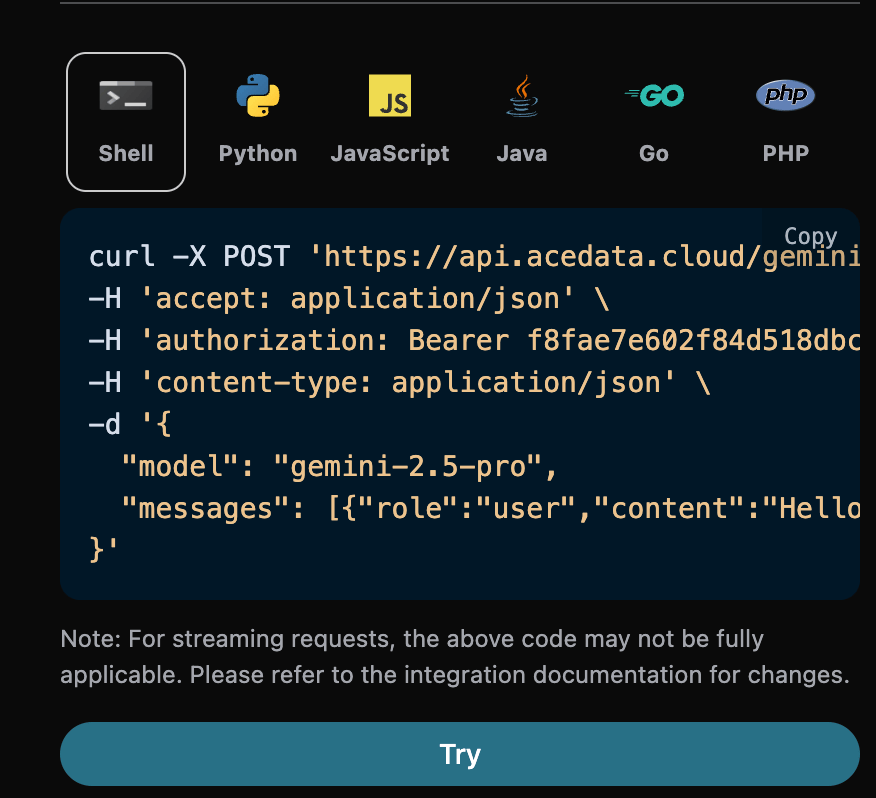
At the same time, you can notice that corresponding invocation code is generated on the right. You can copy the code and run it directly, or directly click the "Try" button for testing.
Note: The flash models in the
gemini-3.xseries are reasoning models and will consume reasoning tokens first; please setmax_tokensto above 512, otherwise only empty content may be returned.gemini-3.8-flashis the currently recommended Flash model, supporting up to 1 million Token context, image input, tool calls, and streaming responses; it is currently called through the Chat Completions interface.
gemini-4-argon can also be used for Chat Completions, supporting standard and streaming text responses. It may allocate part of the output budget to reasoning, so please leave sufficient space for max_tokens for complex tasks; Google recommends at least 32768 for regular tasks with this model. Do not equate this interface with the background long-output feature of the Google Interactions API.
gemini-4-carbon and gemini-4-hydrogen also support standard and streaming text responses through this interface. Carbon is designed for complex reasoning and engineering tasks, while Hydrogen is designed for everyday coding and multi-step tasks. Both consume reasoning Tokens, so sufficient budget should be reserved for max_tokens; the native model's million-Token long output does not mean that this interface provides this feature. Image and tool call fields are still subject to the public contract and actual responses of this interface.
After invocation, we find that the returned result is as follows:
{
  "id": "chatcmpl-20251122212413908150493uPhjTUO9",
  "model": "gemini-3.5-flash",
  "object": "chat.completion",
  "created": 1763817866,
  "choices": [
    {
      "index": 0,
      "message": {
        "role": "assistant",
        "content": "I am a large language model, trained by Google.",
        "reasoning_content": "**My Reasoning: Answering the User's Question**\n\nOkay, here's how I'm going to approach answering the user's question, \"What model are you?\". The core is to be direct and informative. First, I have to be clear about my origin. Then, I need to make sure the explanation is accessible, given that the user may not be familiar with technical jargon. I need to explain what a \"large language model\" actually *does*, and provide relatable examples. I know the user might be looking for a specific name, like other models have, so I'll address that directly and then wrap it up with an invitation to continue.\n\nSo, here's my plan:\n\n1.  **Lead with the key info:** I'll begin by stating that I am a large language model created by Google. That is the fundamental, most critical piece of the puzzle.\n2.  **Define the buzzword:** Then, I'll explain that \"large language model\" in simple terms. I'll explain what I *do* - process and generate text; how I *do* it - by training on huge amounts of text data; and the *goal* - to be able to communicate like a human.\n3.  **Provide context:** After that, to make the concept even clearer, I'll provide a list of examples of my capabilities. I'll mention things like answering questions, summarizing texts, writing stories, translating languages, and brainstorming ideas.\n4.  **Acknowledge the lack of a personal name:** I'll anticipate the likely question about a model name (like ChatGPT) by clearly stating that I don't have a personal name and that it's best to think of me as an AI assistant from Google.\n5.  **End with an invitation:** Lastly, I'll end with a simple, friendly question to invite further interaction and to guide the conversation.\n\nWith this approach, I am confident I can successfully answer this important question.\n"
      },
      "finish_reason": "stop"
    }
  ],
  "usage": {
    "prompt_tokens": 8,
    "completion_tokens": 932,
    "total_tokens": 940,
    "prompt_tokens_details": {
      "cached_tokens": 0,
      "text_tokens": 8,
      "audio_tokens": 0,
      "image_tokens": 0
    },
    "completion_tokens_details": {
      "text_tokens": 0,
      "audio_tokens": 0,
      "reasoning_tokens": 921
    },
    "input_tokens": 0,
    "output_tokens": 0,
    "input_tokens_details": null,
    "claude_cache_creation_5_m_tokens": 0,
    "claude_cache_creation_1_h_tokens": 0
  }
}
The returned result contains multiple fields, introduced as follows:
id, the ID generated for this conversation task, used to uniquely identify this conversation task.model, the selected official Gemini model.choices, the response information provided by Gemini for the prompt.usage: token statistical information for this Q&A session.
Among them, choices contains Gemini's response information. The choices inside it is the specific information of Gemini's response, which can be seen as shown in the figure.
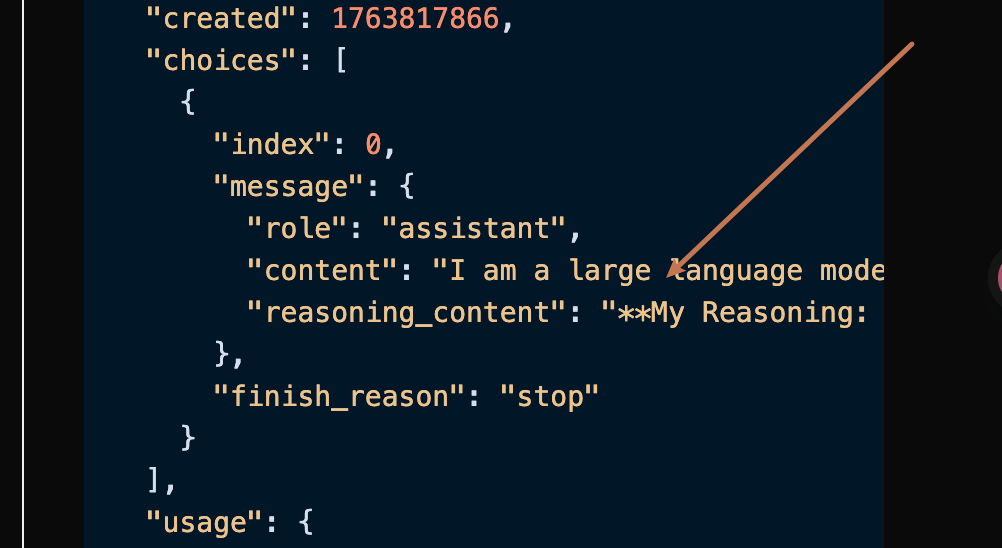
As can be seen, the content field in choices contains the specific content of Gemini's reply.
¶ Image Understanding (Multimodal Input)
Gemini is a native multimodal model that can directly “see images.” To pass an image, change the content of a message from a string to a content block array, and include both text blocks and image_url blocks in the array—this is fully consistent with OpenAI and the official Gemini OpenAI-compatible format.
image_url.url supports two formats:
- base64
data:URI (recommended, most stable): The format isdata:<media type>;base64,<data>, for example,data:image/jpeg;base64,/9j/4AAQ.... The media type (MIME) is already included in thedata:prefix, so there is no need for, and no separatemedia_typefield exists. - Publicly accessible image URL: For example,
https://cdn.acedata.cloud/4hfydw.jpg.
Supported image types: png, jpeg, webp, heic, heif.
Python example call code (base64 data URI):
import base64
import requests

url = "https://api.01ai.cloud/gemini/chat/completions"

# 把本地图片读成 base64 data URI
with open("image.jpg", "rb") as f:
    base64_image = base64.b64encode(f.read()).decode("utf-8")
data_uri = f"data:image/jpeg;base64,{base64_image}"

headers = {
    "accept": "application/json",
    "authorization": "Bearer {token}",
    "content-type": "application/json"
}

payload = {
    "model": "gemini-3.1-pro-preview",
    "messages": [
        {
            "role": "user",
            "content": [
                {"type": "text", "text": "请用一句话描述这张图片。"},
                {"type": "image_url", "image_url": {"url": data_uri}}
            ]
        }
    ]
}

response = requests.post(url, json=payload, headers=headers)
print(response.text)
You can also directly pass a publicly accessible image URL:
payload = {
    "model": "gemini-3.1-pro-preview",
    "messages": [
        {
            "role": "user",
            "content": [
                {"type": "text", "text": "请用一句话描述这张图片。"},
                {"type": "image_url", "image_url": {"url": "https://cdn.acedata.cloud/4hfydw.jpg"}}
            ]
        }
    ]
}
💡
image_urlonly accepts theurlfield (the value can be an image URL or a base64data:URI), as well as the optionaldetailfield. Do not passmedia_type—that is an image field for Anthropic Claude and does not belong to the OpenAI / Geminiimage_urlformat.
¶ Streaming Responses
This API also supports streaming responses, which is very useful for web integration and allows webpages to achieve a word-by-word display effect.
If you want to return responses as a stream, you can change the stream parameter in the request body to true.
Modify it as shown in the image, but the calling code also needs corresponding changes to support streaming responses.
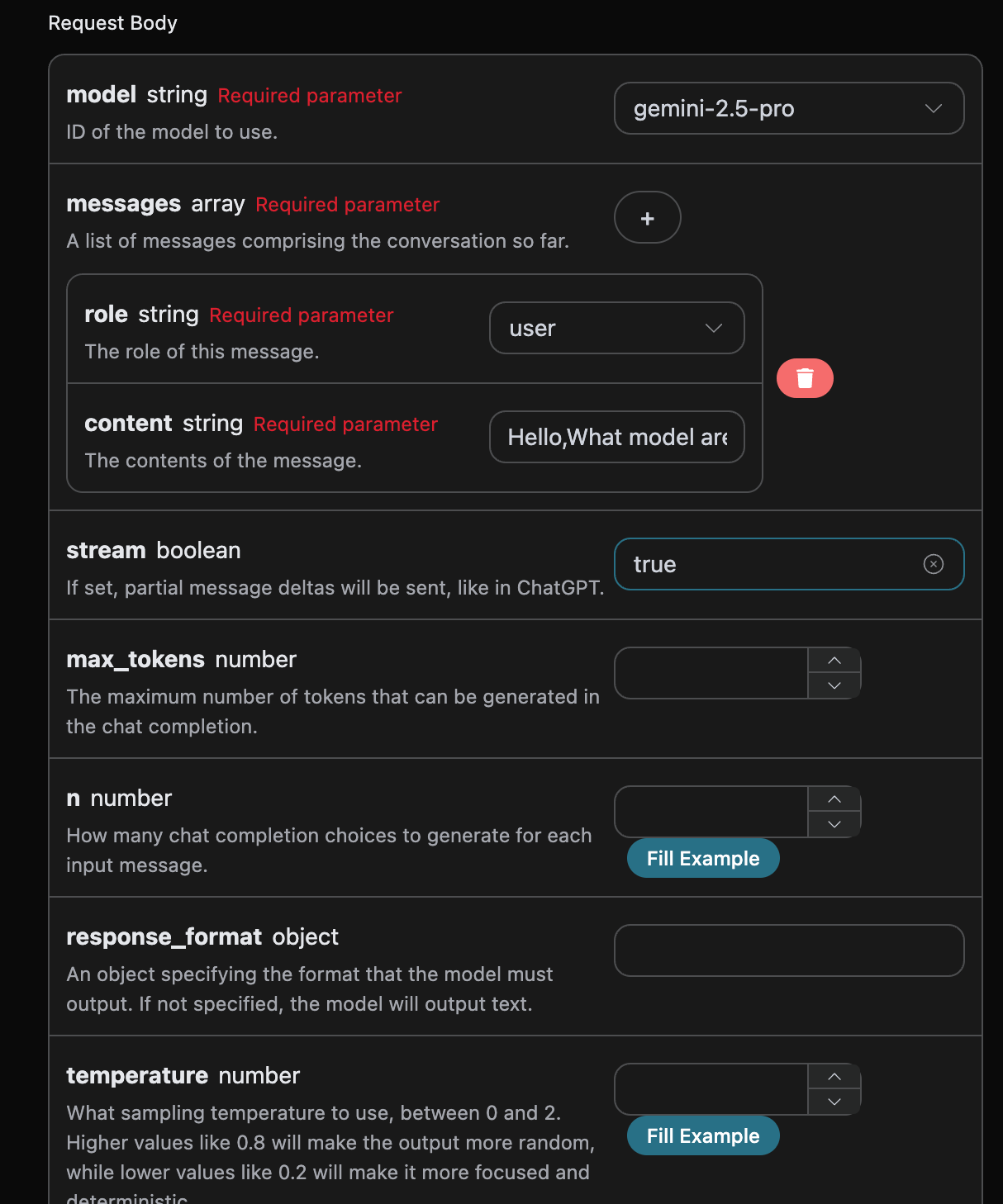
After changing stream to true, the API will return the corresponding JSON data line by line. At the code level, we need to make corresponding changes to obtain the results line by line.
Python example call code:
import requests

url = "https://api.01ai.cloud/gemini/chat/completions"

headers = {
    "accept": "application/json",
    "authorization": "Bearer {token}",
    "content-type": "application/json"
}

payload = {
    "model": "gemini-2.5-pro",
    "messages": [{"role":"user","content":"Hello,What model are you?"}],
    "stream": True,
    "stream_options": {"include_usage": True}
}

response = requests.post(url, json=payload, headers=headers)
print(response.text)
The output effect is as follows:
data: {"id": "chatcmpl-20251122214038810722821kNjUTjtr", "object": "chat.completion.chunk", "created": 1763818842, "model": "gemini-2.5-pro", "system_fingerprint": null, "choices": [{"delta": {"content": "", "role": "assistant"}, "logprobs": null, "finish_reason": null, "index": 0}], "usage": null}

data: {"id": "chatcmpl-20251122214038810722821kNjUTjtr", "object": "chat.completion.chunk", "created": 1763818842, "model": "gemini-2.5-pro", "system_fingerprint": null, "choices": [{"delta": {"reasoning_content": "**Define My Nature**\n\nMy thinking has started. The user wants to know my nature, asking a direct \"what are you?\" The initial step was straightforward: identifying the query. Now, I recall my fundamental identity: I'm a large language model. This is the core truth I aim to convey.\n\n\n"}, "logprobs": null, "finish_reason": null, "index": 0}], "usage": null}

data: {"id": "chatcmpl-20251122214038810722821kNjUTjtr", "object": "chat.completion.chunk", "created": 1763818842, "model": "gemini-2.5-pro", "system_fingerprint": null, "choices": [{"delta": {"reasoning_content": "**Refining My Response**\n\nI've added the crucial information that I'm trained by Google to the basic \"large language model\" identity. My next step is considering what being a \"large language model\" actually entails, so I can explain my core capabilities. I'm focusing on providing context without going into specific technical details or model names. I want to convey my function in a way the user can easily understand.\n\n\n"}, "logprobs": null, "finish_reason": null, "index": 0}], "usage": null}

data: {"id": "chatcmpl-20251122214038810722821kNjUTjtr", "object": "chat.completion.chunk", "created": 1763818842, "model": "gemini-2.5-pro", "system_fingerprint": null, "choices": [{"delta": {"reasoning_content": "**Confirming Core Identity**\n\nI'm now solidifying my response. The user's query about my model affiliation needs a focused answer. I've pinpointed that \"trained by Google\" is essential, providing key context. I'm resisting the urge to mention any specific model names, as it's not relevant. The aim is to deliver a direct, accurate statement. My goal remains a clear and concise reply, avoiding technical jargon and getting straight to the relevant point.\n\n\n"}, "logprobs": null, "finish_reason": null, "index": 0}], "usage": null}

data: {"id": "chatcmpl-20251122214038810722821kNjUTjtr", "object": "chat.completion.chunk", "created": 1763818842, "model": "gemini-2.5-pro", "system_fingerprint": null, "choices": [{"delta": {"content": "I am a large language model, trained by Google."}, "logprobs": null, "finish_reason": null, "index": 0}], "usage": null}

data: {"id": "chatcmpl-20251122214038810722821kNjUTjtr", "object": "chat.completion.chunk", "created": 1763818842, "model": "gemini-2.5-pro", "system_fingerprint": null, "choices": [{"delta": {}, "logprobs": null, "finish_reason": "stop", "index": 0}], "usage": null}

data: {"id": "chatcmpl-20251122214038810722821kNjUTjtr", "object": "chat.completion.chunk", "created": 1763818842, "model": "gemini-2.5-pro", "system_fingerprint": "", "choices": [], "usage": {"prompt_tokens": 8, "completion_tokens": 527, "total_tokens": 535, "prompt_tokens_details": {"cached_tokens": 0, "text_tokens": 8, "audio_tokens": 0, "image_tokens": 0}, "completion_tokens_details": {"text_tokens": 0, "reasoning_tokens": 519}, "input_tokens": 0, "output_tokens": 0, "input_tokens_details": null, "claude_cache_creation_5_m_tokens": 0, "claude_cache_creation_1_h_tokens": 0}}

data: [DONE]
It can be seen that there are many data entries in the response. The choices within data contain the latest response content, which is consistent with the content introduced above. choices contain newly added response content, and you can integrate it into your system based on the result. At the same time, the end of a streaming response is determined based on the content of data. If the content is [DONE], it indicates that the streaming response has completely ended. The returned data result contains multiple fields, introduced as follows:
id, the ID generated for this conversation task, used to uniquely identify this conversation task.model, the selected Gemini official website model.choices, the response information provided by Gemini for the prompt.
JavaScript is also supported. For example, the Node.js streaming call code is as follows:
const options = {
  method: "POST",
  headers: {
    accept: "application/json",
    authorization: "Bearer {token}",
    "content-type": "application/json"
  },
  body: JSON.stringify({
    model: "gemini-2.5-pro",
    messages: [{ role: "user", content: "Hello, what model are you?" }],
    stream: true
  })
};

const response = await fetch("https://api.01ai.cloud/gemini/chat/completions", options);
const reader = response.body.getReader();
const decoder = new TextDecoder("utf-8");
while (true) {
  const { value, done } = await reader.read();
  if (done) break;
  process.stdout.write(decoder.decode(value));
}
Java sample code:
JSONObject jsonObject = new JSONObject();
jsonObject.put("model", "gemini-2.5-pro");
jsonObject.put("messages", new JSONArray().put(new JSONObject().put("role", "user").put("content", "Hello, what model are you?")));
jsonObject.put("stream", true);
MediaType mediaType = MediaType.parse("application/json; charset=utf-8");
RequestBody body = RequestBody.create(jsonObject.toString(), mediaType);
Request request = new Request.Builder()
  .url("https://api.01ai.cloud/gemini/chat/completions")
  .post(body)
  .addHeader("accept", "application/json")
  .addHeader("authorization", "Bearer {token}")
  .addHeader("content-type", "application/json")
  .build();

OkHttpClient client = new OkHttpClient();
Response response = client.newCall(request).execute();
System.out.println(response.body().string());
Other languages can be adapted separately; the principle is the same.
¶ Multi-turn Conversation
If you want to integrate multi-turn conversation functionality, you need to upload multiple prompts in the messages field. A specific example of multiple prompts is shown in the figure below:
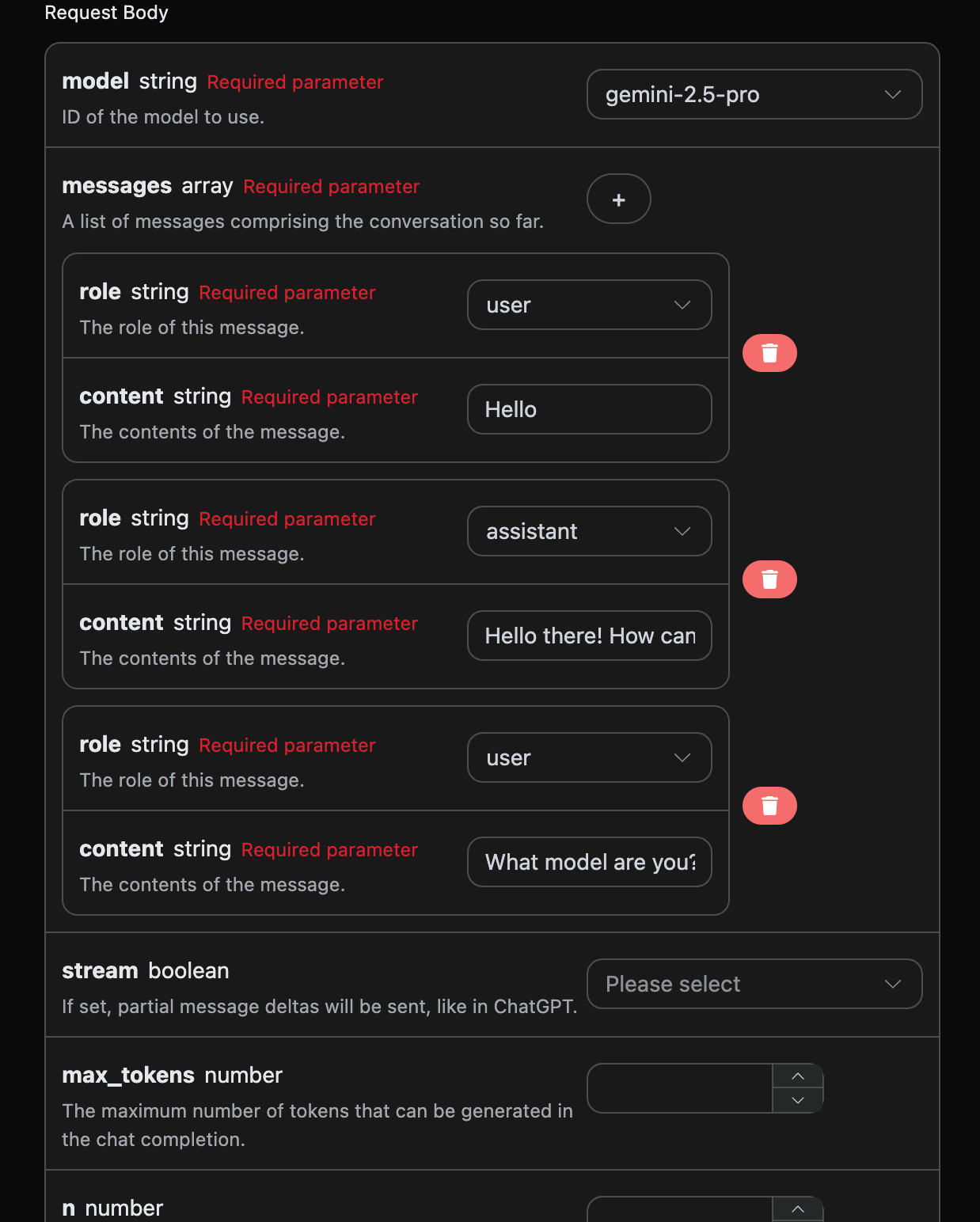
Python sample call code:
import requests

url = "https://api.01ai.cloud/gemini/chat/completions"

headers = {
    "accept": "application/json",
    "authorization": "Bearer {token}",
    "content-type": "application/json"
}

payload = {
    "model": "gemini-2.5-pro",
    "messages": [{"role":"user","content":"Hello"},{"role":"assistant","content":"Hello there! How can I help you today?"},{"role":"user","content":"What model are you?"}]
}

response = requests.post(url, json=payload, headers=headers)
print(response.text)
By uploading multiple prompts, you can easily implement multi-turn conversations and obtain the following response:
{
  "id": "chatcmpl-20251122214426669120974AKFwnJd1",
  "model": "gemini-2.5-pro",
  "object": "chat.completion",
  "created": 1763819072,
  "choices": [
    {
      "index": 0,
      "message": {
        "role": "assistant",
        "content": "I am a large language model, trained by Google.",
        "reasoning_content": "Okay, here's how I'd approach this, thinking as a sophisticated AI:\n\nFirst, the user is directly querying my core identity: \"What model are you?\" That's a simple, straightforward question. My primary task is to provide accurate and helpful information, so I need to answer this immediately.\n\nRight off the bat, I know the answer. I *am* a large language model. That's my fundamental architecture and operational principle. I'm built on a vast network of connections and trained on a massive dataset.\n\nThen I must add the necessary context. Crucially, I have to provide the source of my training. I *was* trained by Google. That's a key identifier. It provides the user with valuable information about my origin and potential biases (though I'm trained to mitigate them).\n\nNow I must construct the response. My goal is to be factual, concise, and understandable.\n\nThe synthesized response is something like: \"I am a large language model, trained by Google.\"\n\nI have to assess the output: Does it meet the criteria? It's clear. It states what I am, it includes a critical piece of information on my origins, and it avoids jargon. No misleading promises.\n\nFinal verification: Does it actually answer the question? Yes. Is the information correct and truthful? Yes. Is it concise? Absolutely. Is the tone appropriate for any user? Yes. And, finally, this is the standard, approved response. Excellent.\n"
      },
      "finish_reason": "stop"
    }
  ],
  "usage": {
    "prompt_tokens": 16,
    "completion_tokens": 265,
    "total_tokens": 281,
    "prompt_tokens_details": {
      "cached_tokens": 0,
      "text_tokens": 16,
      "audio_tokens": 0,
      "image_tokens": 0
    },
    "completion_tokens_details": {
      "text_tokens": 0,
      "audio_tokens": 0,
      "reasoning_tokens": 254
    },
    "input_tokens": 0,
    "output_tokens": 0,
    "input_tokens_details": null,
    "claude_cache_creation_5_m_tokens": 0,
    "claude_cache_creation_1_h_tokens": 0
  }
}
It can be seen that the information contained in choices is consistent with the content used basically. This includes the specific content of Gemini's responses to multiple conversations, so corresponding questions can be answered based on the content of multiple conversations.
¶ Gemini-3.0 Multimodal Model
Request example:
{
  "model": "gemini-3.1-pro-preview",
  "messages": [
    {
      "role": "user",
      "content": [
        {
          "type": "text",
          "text": "图片的内容是什么?"
        },
        {
          "type": "image_url",
          "image_url": {
            "url": "https://cdn.acedata.cloud/qzx2z1.png"
          }
        }
      ]
    }
  ],
  "stream": false
}
Example result:
{
    "id": "chatcmpl-20251206001815715692730UVZe38kB",
    "model": "gemini-3.1-pro-preview",
    "object": "chat.completion",
    "created": 1764951548,
    "choices": [
        {
            "index": 0,
            "message": {
                "role": "assistant",
                "content": "这是一张年轻女性的户外半身人像照片。\n\n以下是图片的主要内容描述:\n\n*   **人物外貌**:照片中的女孩留着一头乌黑柔顺的长直发,五官清秀,皮肤白皙。她面带温柔的微笑,目光注视着镜头。\n*   **穿着打扮**:她穿着一件米白色或浅杏色的泡泡袖上衣,外面搭配着黑色的衣物(看起来像是背带裙或马甲)。\n*   **光影氛围**:阳光从左侧后方照射过来,洒在她的头发上,形成了一圈温暖的金黄色光晕,营造出一种清新、唯美的氛围。\n*   **背景**:背景被虚化处理,可以看出是在户外,身后是一条空旷的路面(柏油路)以及路边的绿色树木。\n\n整体来看,这张照片给人一种甜美、阳光和邻家女孩的感觉。"
            },
            "finish_reason": "stop"
        }
    ],
    "usage": {
        "prompt_tokens": 1092,
        "completion_tokens": 1271,
        "total_tokens": 2363,
        "prompt_tokens_details": {
            "cached_tokens": 0,
            "text_tokens": 4,
            "audio_tokens": 0,
            "image_tokens": 0
        },
        "completion_tokens_details": {
            "text_tokens": 0,
            "audio_tokens": 0,
            "reasoning_tokens": 1072
        },
        "input_tokens": 0,
        "output_tokens": 0,
        "input_tokens_details": null,
        "claude_cache_creation_5_m_tokens": 0,
        "claude_cache_creation_1_h_tokens": 0
    }
}
Of course, you can also pass a video link. The specific input is as follows:
{
  "model": "gemini-3.1-pro-preview",
  "messages": [
    {
      "role": "user",
      "content": [
        {
          "type": "text",
          "text": "视频的内容是什么?"
        },
        {
          "type": "image_url",
          "image_url": {
            "url": "https://cdn.acedata.cloud/58yioe.mp4"
          }
        }
      ]
    }
  ],
  "stream": false
}
Example result:
{
    "id": "chatcmpl-20251206002711949677736JC9yL8AE",
    "model": "gemini-3.1-pro-preview",
    "object": "chat.completion",
    "created": 1764952060,
    "choices": [
        {
            "index": 0,
            "message": {
                "role": "assistant",
                "content": "The content of this video is full of fun, mainly showing an **orange cat** confidently trotting along a country road at dusk.\n\nThe specific details are as follows:\n\n1.  **Visual content**:\n    *   The protagonist is an orange tabby cat.\n    *   The background is a moment at sunset (or early morning), with golden and soft lighting. There are wooden fences and open fields by the roadside, and a silhouette of a pedestrian in the distance.\n    *   The camera uses low-angle shots, sometimes filming the cat running toward the camera, sometimes filming its back as it leaves, as well as close-ups of the cat's face and markings.\n\n2.  **Sound characteristics (key point)**:\n    *   The video's soundtrack is very distinctive. Although the image shows a light-footed cat running, the accompanying sound is that of **heavy and rhythmic horse hooves** (or a sound similar to clogs/high heels striking the road).\n    *   The contrast between this sound and the visuals creates a sense of humor, as if this cat sees itself as a galloping steed.\n\nOverall, this is a pet video that uses the contrast between sound and image to create cuteness and humor."
            },
            "finish_reason": "stop"
        }
    ],
    "usage": {
        "prompt_tokens": 915,
        "completion_tokens": 1423,
        "total_tokens": 2338,
        "prompt_tokens_details": {
            "cached_tokens": 0,
            "text_tokens": 5,
            "audio_tokens": 0,
            "image_tokens": 0
        },
        "completion_tokens_details": {
            "text_tokens": 0,
            "audio_tokens": 0,
            "reasoning_tokens": 1162
        },
        "input_tokens": 0,
        "output_tokens": 0,
        "input_tokens_details": null,
        "claude_cache_creation_5_m_tokens": 0,
        "claude_cache_creation_1_h_tokens": 0
    }
}
As can be seen from the above, the Gemini 3.0 model can support multimodal understanding.
¶ Gemini-3.1 Multimodal Model
gemini-3.1-pro-preview is the official model ID for the current Gemini 3.1 Pro. It supports multimodal inputs such as text, images, and videos, and is suitable for complex reasoning, coding, and comprehension tasks.
Request example:
{
  "model": "gemini-3.1-pro-preview",
  "messages": [
    {
      "role": "user",
      "content": [
        {
          "type": "text",
          "text": "What is in the image?"
        },
        {
          "type": "image_url",
          "image_url": {
            "url": "https://cdn.acedata.cloud/qzx2z1.png"
          }
        }
      ]
    }
  ],
  "stream": false
}
Gemini 3.1 Pro also supports video understanding:
{
  "model": "gemini-3.1-pro-preview",
  "messages": [
    {
      "role": "user",
      "content": [
        {
          "type": "text",
          "text": "What is in the video?"
        },
        {
          "type": "image_url",
          "image_url": {
            "url": "https://cdn.acedata.cloud/58yioe.mp4"
          }
        }
      ]
    }
  ],
  "stream": false
}
The response format is consistent with Gemini 3.0 Pro. For details, see the description in the Gemini-3.0 Multimodal Model section above.
¶ Error Handling
When calling the API, if an error is encountered, the API will return the corresponding error code and message. For example:
400 token_mismatched: Bad request, possibly due to missing or invalid parameters.400 api_not_implemented: Bad request, possibly due to missing or invalid parameters.401 invalid_token: Unauthorized, invalid or missing authorization token.429 too_many_requests: Too many requests, you have exceeded the rate limit.500 api_error: Internal server error, something went wrong on the server.
¶ Error Response Example
{
  "success": false,
  "error": {
    "code": "api_error",
    "message": "fetch failed"
  },
  "trace_id": "2cf86e86-22a4-46e1-ac2f-032c0f2a4e89"
}
¶ Conclusion
Through this document, you have learned how to easily implement the official Gemini's conversational capabilities using the Gemini Chat Completion API. We hope this document helps you better integrate and use this API. If you have any questions, please feel free to contact our technical support team.